
P11D is a form you cannot ignore, especially when you are handling payroll on behalf of your clients. It is through this form that you will be able to keep a track of the benefits and perks provided by your clients to their employees. But this task is also a source of frustration for many small accounting practices.
Let’s understand it in a simple way.
One accounting practice handling payroll processing for multiple clients was approached one day by a client close to the P11D deadline. The client informed that they missed out on informing the fleet car benefit for their director. This seemingly small mistake caused hasty corrections and desperate communication with HMRC.
This tells you that understanding what P11D is, the information required, and how to submit it correctly is important, not for compliance’s sake but to safeguard your client’s trust in you.
This guide will walk you through P11D reporting in 2026, highlighting best practices, common mistakes, and how services like Equallto can streamline the process.
Key Takeaways
- P11D form is for reporting taxable benefits and expenses provided to their employees by their employers
- It will protect your practice and your clients from HMRC penalties.
- Know the common pitfalls like missing benefits, delayed submissions, and incorrect valuations.
- Use of tools or payroll outsourcing services to save time and effort.
- Knowing deadlines, difference between P11D vs P11D(b), and upcoming changes to ensure compliance.
What Is a P11D?
P11D is a tax form used by employers to report benefits in kind provided by them to their employees or directors. These benefits are separate from the employee’s salary or wages and could include.
- Company cars and fuel
- Health insurance
- Gym memberships
- Interest-free loans
- Assets provided for private use
These forms must be submitted to the HMRC, who will then calculate the total amount of tax and National Insurance an employee will have to pay on their salary annually. Not reporting the benefits will automatically trigger fines.
P11D Form Explained: What Information Needs to Be Reported
The P11D form has to be filled with detailed information on:
Employee Details
- Name
- National Insurance number
- Payroll reference
Taxable Benefits Provided
- Cars and car fuel
- Private medical insurance
- Loans and assets
- Expenses paid on behalf of employees
Cash Equivalents of Benefits
- Monetary value of goods or services provided
- Adjusted for personal usage where applicable
Employer Contributions
- Pension contributions or other benefits outside salary
Keep an accurate record of all the benefits that your clients provide to their employees, or ask your clients to keep an internal record of it, to make reporting straightforward.
P11D Deadline: Key Dates Every Employer Must Know (2026)
Cannot miss the P11D deadlines for the tax year 2025–26, which are:
- Submission to HMRC: July 6 2026
- Payment of Class 1A National Insurance: July 22 2026 (or July 19 if paying by post)
Missing these deadlines will trigger penalties of £100 per 50 employees for each month or part month your P11D(b) is late. Your client will also be charged penalties and interest if you’re late in paying HM Revenue and Customs.
How to Complete and Submit a P11D (Step-by-Step Guide)
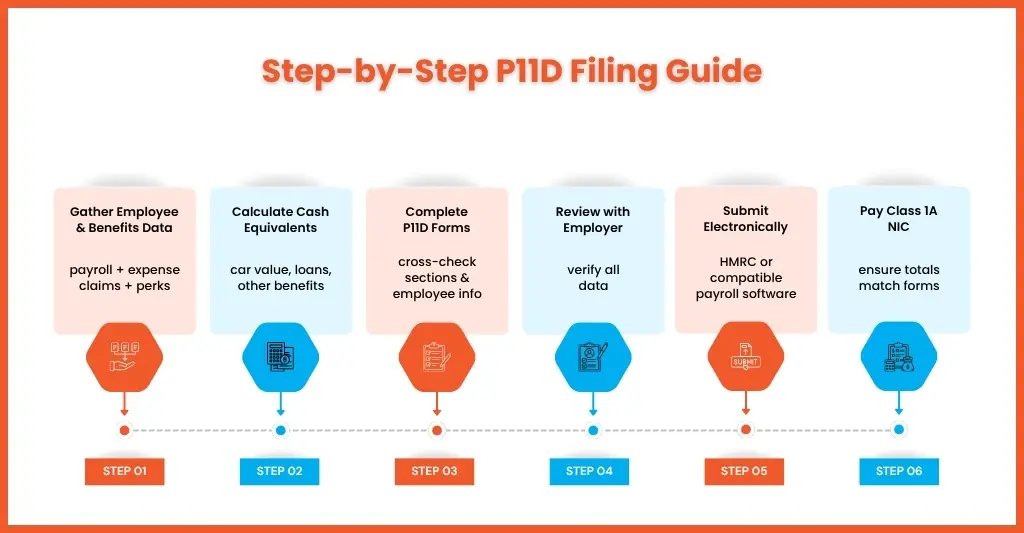
Filling and submitting the P11D forms on behalf of your clients is an important responsibility, and to do that smoothly, you need to follow our step-by-step guide.
Gathering Employee and Benefit Data
Before you start filling out, ensure you have all the necessary information on hand. This includes:
- Payroll records for the tax year
- Expense claims submitted by employees
Details of company-provided benefits, such as:
- Company cars and fuel
- Health insurance
- Mobile phones or laptops
- Interest-free or low-interest loans
Keep a centralised database of benefits and expenses for all clients. This reduces errors and prevents the need for chasing multiple employees for missing information.
Calculate Cash Equivalents
In the next step, you will have to calculate the taxable cash value of each benefit provided by your client. That amount has to be paid by the employee for that benefit if the client is not providing it.
For example, a company car’s taxable value depends on:
- List price of the vehicle
- CO₂ emissions
- Fuel type
- Loans or assets must also be converted into monetary values for reporting
HMRC provides clear guidance for each benefit type, but using an automated solution like Equallto ensures these calculations are precise and consistent for every client.
Complete P11D Forms
Once you have all the required data, start filling in the P11D forms for each employee.
- It contains 14 sections, so ensure each benefit type is reported in the correct section (e.g., cars, loans, expenses).
- Cross verify the employee details such as name, National Insurance number, and payroll reference.
- Add any reimbursed expenses and taxable allowances.
Avoid the mistake of misclassifying benefits or missing out on minor perks; even a small oversight can trigger HMRC penalties.
Review with Employer
Once you have completed filing the form, send it to your client for a complete review. Under this review, your client will check:
- Cash equivalents and employee details are correct
- Ensure any special adjustments (e.g., partially reimbursed expenses) are reflected
- Verify any unusual benefits or complex arrangements
A quick review helps in identifying errors, thus reducing the chance of HMRC queries and builds client confidence.
Submit Electronically to HMRC
Since April 2023, all P11D and P11D(b) forms have been required to be submitted digitally to the HMRC. You can do that using the:
- HMRC online service or compatible payroll software
- Ensure all employee forms are submitted under the correct payroll reference
- Keep a record of each submission made by your practice
Always use a reputable payroll software like Xero or QuickBooks, which are integrated with HMRC. Such software automates the submissions and reduces errors, thus eliminating manual work and last-minute submissions.
Calculate and Submit Class 1A NIC
P11D submissions are closely tied to Class 1A NIC, which employers must pay on most benefits:
- Calculate the total Class 1A NIC liability from all reported benefits
- Submit and pay before the HMRC deadline (usually July 22, or July 19 if paying by post)
- Ensure the payment matches the values reported on the P11D
Executing these steps is a task for a small accounting practice, especially when it involves a lot of calculations, submissions, and compliance reviews for multiple clients and hundreds of their employees.
In such situations, payroll outsourcing services offered by professionals like Equallto can come to your rescue. They will automate calculations, submissions, and compliance reviews, saving valuable time.
P11D vs P11D(b): What’s the Difference and Do You Need Both?
Make a point to stop your clients from making P11D vs P11D(b) because both are distinct and important. P11D(b) form informs HMRC how much Class 1A National Insurance your client will need to pay for the benefits provided to their employees, and to declare that they have sent the forms to HMRC.
In short:
- P11D: Reports benefits in kind for each employee.
- P11D(b): Summarises the employer’s Class 1A NIC liability for all benefits.
And your clients need both to remain fully compliant.
Why P11D Matters
A P11D form matters to the HMRC because it’s a tax document that is used for reporting employee benefits-in-kind to the HMRC, so that tax is not paid on non-cash perks. By submitting these forms in an electronic format, you are ensuring:
- Regulatory payroll compliance, so that your clients comply with HMRC rules
- Accurate taxation to prevent under- or overpayment of employee taxes
Common Mistakes to Avoid When Filing P11D
Even experienced payroll teams can commit mistakes while filing P11D forms. However, these errors will lead to HMRC penalties, extra workload, and unhappy clients. Let’s understand some of the common mistakes and ways to avoid them.
Forgetting to Report Small or Irregular Benefits
While your focus must be rightly on the major benefits like company cars and health insurance, that does not mean you must overlook minor perks like:
- Free or subsidised meals
- Gym memberships
- Mobile phone usage
- Gifts or vouchers
Missing out on even minor perks will attract fines, especially when it impacts multiple employees. To avoid such mistakes, you will need to maintain a log throughout the year and keep updating it.
Incorrect Valuation of Assets
Assigning the wrong cash equivalent to benefits is a common source of errors. This happens when miscalculations take place in:
- The taxable value of company cars (based on CO₂ emissions and list price)
- Loans or assets provided at below-market rates
- Discounts on goods or services for employees
Underreporting will lead to fines, and overreporting will unnecessarily increase employee tax liability. This mistake can be avoided by having clear HMRC guidance and automated calculations.
Late Submissions or Payments
Missing the deadlines is one of the costliest common mistakes, and it usually happens due to too much reliance on manual systems. The impact of this mistake is a fine of £100 per employer for late submission, plus interest on unpaid Class 1A NIC.
Therefore, set reminders and conduct submissions well in advance and as much as possible, automate the submission and payment process.
Failing to Update P11D with Payroll Changes
Employee benefits can change mid-year due to:
- Role changes
- New benefits introduced
- Termination or onboarding of staff
And submitting outdated forms that don’t reflect current payroll data will trigger HMRC queries, and their rectification will consume additional time and resources.
The solution will be to integrate the form preparation with your payroll system so that payroll changes are automatically reflected on the forms in real-time.
Using Outdated Forms or Software
Using an old version or non-HMRC-verified software will cause submission errors, leading to forms getting rejected or delayed and potential penalties. Always use MTD-compatible software and current HMRC forms so that your submissions meet all regulatory requirements.
Another easy way of eliminating these common mistakes and further streamlining reporting is by using the payroll outsourcing services of professional providers like Equallto, which is being preferred by accounting practices.
Upcoming Changes to P11D (2026–2027 Update)
From April 6 2026, reporting and payment of Income Tax and Class 1A NICs on most benefits-in-kind (except employment-related loans and accommodation) will be done in real-time on the Full Payment Submission, thus eliminating P11D.
To be prepared for such future changes in compliance, you will need to focus on adopting automated or outsourced systems.
FAQs on P11D
What is a P11D and why is it important
P11D is a tax form used by employers to report benefits in kind provided by them to their employees or directors. These forms must be submitted to the HMRC, who will then calculate the total amount of tax and National Insurance an employee will have to pay on their salary annually. Not reporting the benefits will automatically trigger fines.
Who needs to file a P11D form?
All employers who provide benefits to their employees are required to file a P11D form. Even the smallest perk must be reported through this firm, or else it will trigger an HMRC penalty.
What is the deadline for submitting P11D in 2026?
The submission deadline to HMRC: July 6 2026, and the payment of Class 1A NIC deadline is July 22 2026 (or July 19 if paying by post).
Who is responsible for paying P11D tax?
Employees and directors usually pay the income tax on P11D benefits, which is collected via a reduced tax code or self-assessment.
Is P11D compulsory?
Yes, P11D forms are currently mandatory for UK employers to report taxable expenses or benefits provided to employees (e.g., company cars, health insurance) that are not processed through payroll. They must be submitted to HMRC by July 6 following the end of the tax year. Note: From April 2026, payrolling benefits will be mandatory, largely eliminating these forms.
Final Thoughts on P11D
Getting the P11D done accurately is an important responsibility for your practice, which your client expects to fulfil, especially when HMRC scrutiny becomes greater in 2026. To which complete mastery over filing and submission you will need to focus:
- Automation + expert support for fewer errors and faster payroll processing
- Compliance-first approach for peace of mind and client trust
- Scalable systems for handling multiple clients without overloading your team
Equallto offers that to small accounting practices by:
- Automating P11D preparation and submission
- Staying compliant with deadlines
- Reducing manual work for staff
- Improving overall client service
Wanting to streamline your P11D filing process? Get in touch through our contact form and see how we make you future-ready.
