

Payroll processing is the recurring cycle of calculating employee pay, applying PAYE income tax, National Insurance and other deductions, paying employees, and reporting each payment to HMRC through Real Time Information on or before payday. UK accounting practices run this cycle weekly, fortnightly, four-weekly or monthly for every client they act for.
While doing payroll processing for your clients, expect to get bombarded with questions like “One employee’s net pay looks wrong. Can you check before Monday?” and “HMRC says our FPS was late, are we getting a penalty?”
When you start with payroll processing, you will have to deal with deadlines, RTI submissions, pension uploads, holiday pay queries, and many more. No wonder it is high-risk, high-pressure, but an important responsibility for your practice. Any mistakes here will lead to inaccurate or delayed payments, breaking the trust of the employees and of your clients in you.
To help you streamline your payroll processing, we have created this guide. Here we have broken down the payroll process, the compliance rules that matter, the mistakes practices commonly make, and most importantly, why outsourcing payroll processing services is becoming a strategic decision for UK practices in 2026.
Let’s dive into the world of payroll processing.
What Is Payroll Processing and Why Does It Matter for UK Firms?
Payroll processing matters in the UK because every payment to an employee must be reported to HMRC on or before the day it is made. There is no monthly catch-up window. A single missed submission triggers an automatic penalty, and a single wrong tax code changes what an employee takes home that month.
Payroll processing involves calculating employee salaries, deductions and taxes, as well as ensuring that payments are made correctly and on time. The responsibility of handling this was with respective companies’ HR and payroll departments, but now accounting practices are handling the process and keeping it compliant as per payroll regulations on their behalf.
Payroll processing includes:
- Calculating gross pay
- Applying PAYE income tax and National Insurance
- Handling statutory payments (SSP, SMP, etc.)
- Submitting RTI returns
- Paying employees correctly and on time
Why it matters so much in the UK:
- Payroll errors directly affect your client employees’ take-home pay
- Payroll errors UK will lead to HMRC applying penalties quickly
- One mistake can cost you the trust of your client
A survey conducted by Access Paycircle as part of PeopleHR’s UK Payslip Anxiety Report shows that 63.85% employees claimed to have received incorrect pay during their employment. This statistic will add pressure to your small accounting practice.
What Are the Key Steps Involved in Payroll Processing?
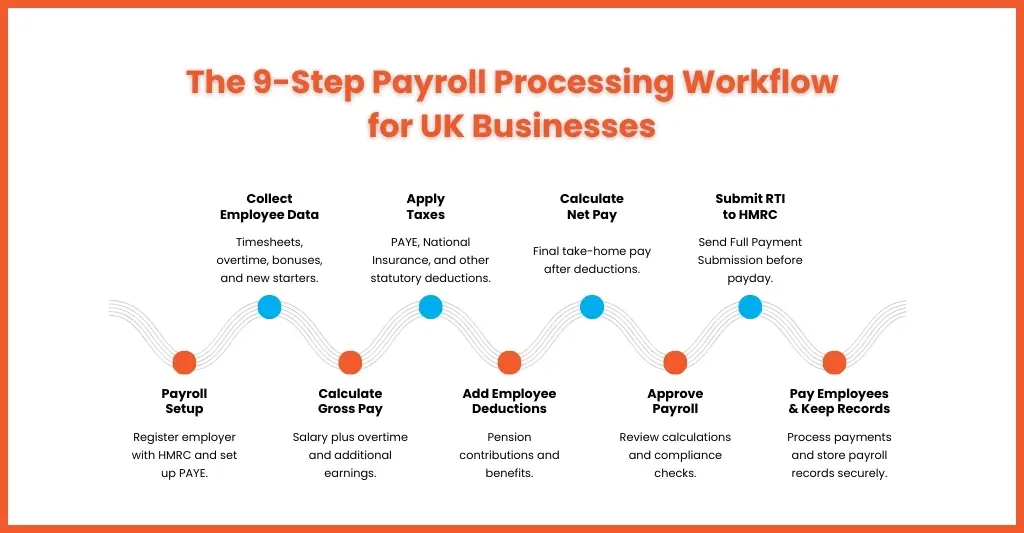
There are nine steps in a UK payroll cycle: complete PAYE setup, calculate gross pay, calculate PAYE and National Insurance, apply other deductions, calculate net pay, approve the payroll, pay employees and issue payslips, file the FPS with HMRC on or before payday, and retain the records.
1. Complete All Payroll Setup Tasks
Before starting the payroll processing for your client, ensure that the initial setup is carried out. It includes registering your client with the HMRC as an employer and setting up a PAYE Online account, as well as making your client understand its legal obligations.
Understanding legal obligations is important because it ensures your client stays compliant with HMRC regulations or else faces penalties.
2. Calculate Gross Pay
Once you have set up the PAYE account for your client and chosen the software, you must start calculating the gross pay for each of their employee. This is done by multiplying their pay rate by the number of hours worked within the pay period to get their base salary.
Also include any overtime pay, bonuses or additional earnings to calculate their gross pay. Not including these additional earnings will lead to incorrect deductions and tax calculations, so take care of that.
3. Calculate Payroll Taxes
It is important to calculate payroll taxes to ensure that your clients’ compliance and the employees are paid accurately. Any mistakes in this could spoil the relations between the employee and your employer client or lead to legal consequences for your clients and bad repute for you.
The tax each employee has to pay will depend on their tax code and National Insurance. Use the calculators offered by HMRC to check calculations for payroll like tax, National Insurance contributions, and student loan deductions.
4. Determine Employee Deductions
Identify any other deductions such as pension contributions, health insurance premiums, and other benefits. Understand the importance of differentiating between pre-tax deductions and post-tax deductions and ensure it is calculated at the right point of the payroll process for accurate payments.
5. Calculate Net Pay
Once the taxes and employee deductions are calculated, you need to deduct them from the gross pay. The amount left is called the net pay, also called the final amount, which the employee takes home.
6. Approve Payroll
Conduct a thorough review of the processing to make sure that each employee is paid correctly and that it is in compliance with the latest HMRC payroll regulations. It might be tempting to skip this step, especially during busy periods, but it’s an important safeguard against payroll errors and discrepancies.
7. Payment to Employees
Ensure the payroll is processed on time to maintain employee trust. These payments can be made via BACS, online payment, cheque or cash. Also, make the payslip available to the employee, and it must show their earnings before and after deductions.
8. File Tax Reports on Time
The FPS deadline is the payment date itself, not the end of the month. If employees are paid on the 25th, the FPS is due on the 25th. HMRC applies an informal three-day grace period, but relying on it is not a control.
9. Maintain Accurate Records
The final step of payroll processing is maintaining the records and keeping them secure in a digital format in an encrypted cloud storage. Payroll records must be kept for at least three years from the end of the tax year they relate to, and HMRC can charge a penalty of up to £3,000 per tax year where records are not kept.
What changed in UK payroll from April 2026?
April 2026 brought the largest set of UK payroll changes in years. Statutory Sick Pay became payable from day one of absence with the Lower Earnings Limit test removed, the National Living Wage rose to £12.71, and paternity and unpaid parental leave became day-one rights under the Employment Rights Act 2025.
The four changes that alter how you run a payroll run:
1. Statutory Sick Pay is now paid from day one
Up to 5 April 2026, SSP started on the fourth qualifying day and only for employees earning above the Lower Earnings Limit. From 6 April 2026 both conditions were removed. SSP is now paid from the first full day of sickness absence to all eligible employees regardless of earnings, at the lower of £123.25 a week or 80% of normal weekly earnings. This is the most significant change to SSP since it was introduced in 1983.
2. New National Minimum and Living Wage rates
From 1 April 2026 the National Living Wage for workers aged 21 and over rose 4.1% to £12.71 an hour. The 18–20 rate rose 8.5% to £10.85, and the 16–17 and apprentice rates rose to £8.00. Around 2.7 million workers received a pay rise. Age-band birthdays mid-year remain the most common cause of accidental underpayment.
3. Paternity and unpaid parental leave became day-one rights
The 26-week service requirement for statutory paternity leave and the one-year requirement for unpaid parental leave were both removed on 6 April 2026. New starters can now take both from their first day, which changes how starter records and leave entitlements must be set up.
4. Payrolling of benefits in kind becomes mandatory from April 2027
Reporting benefits in kind through payroll rather than on a P11D becomes mandatory for all employers from 6 April 2027. It is voluntary for 2026/27. Practices with clients providing company cars or private medical cover should register and migrate during 2026/27 rather than in the year it becomes compulsory.
What are the UK payroll compliance rules for 2026/27?
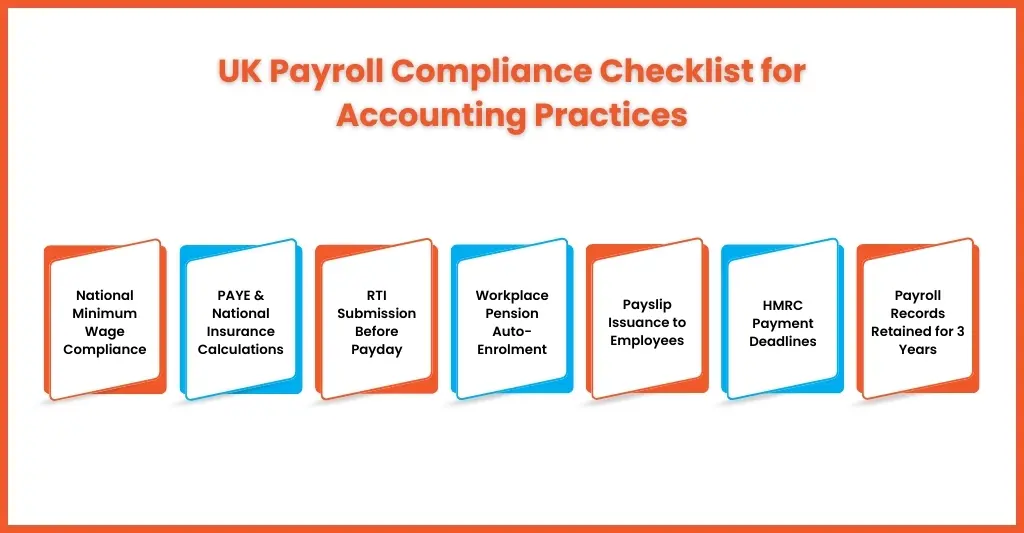
UK payroll compliance covers six obligations: paying at least the National Minimum Wage, operating PAYE correctly, calculating National Insurance, submitting RTI returns on or before payday, meeting auto-enrolment pension duties, and retaining payroll records for at least three years from the end of the tax year.
National Minimum Wage (NMW) and National Living Wage (NLW)
The National Minimum Wage and National Living Wage are applicable to employees depending on their ages. Track work time and attendance to apply the correct wages in accordance with the law.
Pay As You Earn (PAYE)
PAYE is HMRC’s system for collecting Income Tax and National Insurance Contributions (NICs) from employment.
National Insurance Contributions (NICs)
Your client needs to pay NICs on their employees’ earnings. The rates will depend on the earnings. Most of your client employees will come under Class 1 NICs.
According to HMRC, an employee’s Class 1 National Insurance is made up of contributions:
- Deducted from their pay (employee’s National Insurance)
- Paid by their employer (employer’s National Insurance)
- Real Time Information (RTI)
As per RTI, all payroll data must be submitted in real time to HMRC. Late submissions will trigger automatic penalties.
Workplace Pensions
Auto-enrolment compliance under The Pensions Regulator is mandatory. Missed contributions can lead to fines.
Keep Records
All payroll records must be stored for 3 years from the end of the tax year. HMRC might demand the records for audit purposes.
What are the most common payroll processing mistakes UK practices make?
The five most common payroll processing mistakes are late RTI submissions, incorrect tax codes, auto-enrolment pension errors, holiday pay miscalculations for variable-hours staff, and payroll journals that are posted but never reconciled. Four of the five carry a direct financial penalty; the fifth surfaces at year end as an audit problem.
Late RTI Submissions
Under Real Time Information rules, the Full Payment Submissions must be sent to the HMRC on or before the pay day. Missing it will lead to penalties.
Late RTI submissions usually happen because:
- Clients send overtime or bonus data late
- Amendments are made after payroll is processed
- No formal cut-off time exists
- One staff member handles all payroll and is unavailable
- Late submissions at regular intervals will damage your practice reputation.
How to avoid it:
- Set strict payroll cut-off dates and communicate them clearly
- Create a standard payroll calendar for all clients
- Process payroll at least 2–3 working days before the pay date
- Build buffer time for amendments
Incorrect Tax Codes
Adding incorrect tax codes is one of the quickest ways to demoralise an employee. Such an error leads to:
- Overpaid or underpaid tax
- Employee complaints
- Year-end reconciliation headaches
Tax codes change through:
- P6 notices
- P9 notices
- Emergency code updates
- Starter checklist submissions
When these notices are ignored, an error occurs.
How to avoid it:
- Review HMRC notifications weekly
- Assign a dedicated accountant for monitoring tax code updates
- Cross-check codes during each payroll run
Accurate tax coding protects both your client and your reputation.
Pension Errors
Auto-enrolment of a new employee under the pension regulator is compulsory.
Some of the common pension errors that occur are:
- Failing to enrol eligible employees
- Incorrect contribution percentages
- Missing re-enrolment dates
- Not processing opt-outs correctly
- Late pension submissions
Mistakes in pensions will attract heavy penalties from the regulator.
To avoid it, you will need to:
- Use payroll software with built-in pension checks
- Maintain a pension staging and re-enrolment calendar
- Reconcile pension deductions before submission
- Confirm contribution uploads after each payroll
Pensions are compliance-heavy, and a small mistake will cost your client dearly.
Holiday Pay Miscalculations
The frequency of holiday pay errors is rising in recent years, especially among:
- Variable-hours workers
- Overtime-heavy roles
- Shift-based employees
It has often been found that practices use outdated calculation methods, incorrect reference periods, and forget about regular overtime, which leads to this error.
How to avoid it:
- Use the correct 52-week reference period rules
- Include regular overtime where applicable
- Review holiday pay logic annually
- Ensure payroll software settings are updated
Payroll Journals Not Reconciled
It’s a problem that most practices overlook. Most focus on payroll processing, issuing of payslips, and transferring deductions to the HMRC. But the payroll journal isn’t properly reconciled in the accounts.
This creates:
- Management account mismatches
- Incorrect expense reporting
- Year-end adjustments
- Frustrated auditors
Often, payroll journals are posted automatically but never reviewed.
To avoid it, you will need to:
- Reconcile payroll control accounts monthly
- Match PAYE liability accounts to HMRC payments
- Review pension creditor balances
- Do payroll reconciliation in your monthly close checklist
In-House vs Outsourced Payroll Processing — Which Is Right for Your Practice?
Process payroll in-house if volumes are stable, you have more than one trained person, and payroll is priced as part of a wider client relationship. Outsource if volumes swing seasonally, one person holds all the knowledge, or compliance risk is growing faster than the fee income the work generates.
| Factor | In-house payroll | Outsourced payroll processing |
| Control | Direct, immediate | Retained through agreed approval points |
| Client familiarity | High | Builds over the first two or three cycles |
| Key-person risk | High — often one trained person | Removed; cover is contractual |
| Peak capacity (April, year end) | Fixed; overtime or delays | Scales without recruitment |
| Compliance monitoring | Internal responsibility | Provider-managed and specialist |
| Cost shape | Fixed salary, NIC, pension, software | Variable, tied to volume |
| Software licensing | Practice buys and maintains | Often included |
| Setup effort | None | Structured handover required, typically 4–6 weeks |
| Best suited to | Stable volumes, more than one trained person | Seasonal swings, growth, or single-person dependency |
Due to complex payroll regulations in the UK, payroll processing has become time-consuming and generates less revenue. In the in-house vs payroll outsourcing, practices are finding it beneficial to avail themselves of the payroll outsourcing UK services.
Why Outsource Payroll Processing Services in the UK?
UK accounting practices outsource payroll processing to remove single-person dependency, absorb April and year-end peaks without hiring, reduce the compliance risk created by frequent legislative change, and release senior staff from low-margin processing work into advisory services that carry a higher fee.
Yes, payroll outsourcing cost less compared to in-house payroll but practices are increasingly depending on outsourcing payroll because:
- It reduces payroll compliance risk
- Handle peak periods without hiring
- Eliminates dependency on one staff member
- Improves turnaround times
- Free’s senior staff for advisory work
Outsourcing will help you to maintain and improve your relations with your clients by fulfilling their payroll needs without falling into operational strain. Consider certain factors before you choose a payroll outsourcing partner, based on that you will find the best one for yourself.
How to Choose the Right Payroll Processing Software for UK Businesses
Choose HMRC-recognised payroll software that files RTI directly, updates tax and NIC rates automatically each April, integrates with the client’s pension provider, validates before submission, and keeps a full audit trail. For practices, bureau licensing cost per client and bulk processing usually decide it.
- HMRC-recognised RTI filing
- Automatic tax and NIC updates
- Pension integration
- Error alerts and validations
- Clear audit trails
Sage Payroll, BrightPay, Xero Payroll, IRIS Payroll and Moneysoft are the platforms most commonly used by UK practices, and all are HMRC-recognised. HMRC publishes a full list of recognised payroll software, including free options for employers with fewer than 10 employees.
People Also Ask
How long does payroll processing take?
A clean monthly payroll of under 50 employees typically takes two to four hours per cycle, from data collection to FPS submission. Variable hours, multiple pay frequencies, pension uploads and starter or leaver processing can double that. Most of the time goes on chasing client data, not calculating pay, which is why fixed cut-off dates shorten a run more than faster software does.
How much does outsourcing payroll processing services cost in the UK?
Outsourced payroll processing is usually priced per payslip per pay run, with a small monthly scheme fee on top. In-house processing costs salary, employer National Insurance at 15% above £5,000, pension contributions, software licensing and holiday cover. Outsourcing tends to be cheaper for practices whose payroll volume swings between the April peak and quieter months.
What happens if you make a payroll processing error in the UK?
HMRC charges a fixed monthly late-filing penalty based on PAYE scheme size: £100 for 1 to 9 employees, £200 for 10 to 49, £300 for 50 to 249, and £400 for 250 or more. The first default in a tax year is not penalised, and a three-day grace period applies. Returns over three months late attract a further 5% penalty.
What are the 5 basic steps in processing payroll?
The five basic steps are: collect and verify employee data, calculate gross pay, apply PAYE, National Insurance and other deductions to reach net pay, pay employees and issue payslips, then submit the Full Payment Submission to HMRC on or before payday and retain the records for at least three years from the end of the tax year.
Which payroll software is best in the UK?
There is no single best option. Sage Payroll, BrightPay, Xero Payroll, IRIS and Moneysoft are all HMRC-recognised and handle RTI and auto-enrolment. For practices, the deciding factors are usually bureau licensing cost per client, bulk processing across clients, and how cleanly the software handles year end and pension uploads. Check HMRC’s recognised software list before committing.
Is payroll processing part of Making Tax Digital?
No. Making Tax Digital applies to VAT and, from 6 April 2026, to Income Tax Self Assessment for sole traders and landlords with qualifying income over £50,000. HMRC has confirmed PAYE income does not count towards that threshold. Payroll is reported separately through RTI, which has required on-or-before reporting since 2013.
Conclusion
Here’s a reality check for all small accounting practices: payroll processing is going to get tougher this year, with many rule changes, tight deadlines, and high client expectations. All this will lead to high time consumption and limited value addition.
Such a situation will force you to:
- Keep the firefighting payroll every month
- Or build a payroll model that is accurate, compliant, and scalable
The smartest practices do not drop payroll as a service. They stop processing it themselves.
It’s time to turn payroll from a source of stress to a source of benefit, and the first step towards that is by availing the payroll outsourcing services to get the job done. Equallto will make the transition smooth and turn your payroll process into a profitable venture.
Time to act! Connect with us and get more details about our services. Looking forward to seeing you soon.
Practices that outsource payroll often move bookkeeping and management accounting at the same time, since the same client data feeds all three.
