
Accounting automation software replaces manual, repetitive accounting tasks – data entry, bank reconciliation, transaction categorisation, VAT submissions, and payroll journal entries with automated workflows. For UK accounting practices managing multiple clients, the right automation setup reduces manual processing time by 40–60% per client cycle and allows your team to take on more work without increasing headcount.
But most practices that invest in automation do not get those results. They buy tools without fixing the underlying process first, automate the wrong tasks, or choose software that does not integrate with what they already use. This guide covers what accounting automation software actually does, which tasks to automate first, how to choose tools that fit your practice size, and how to implement without disrupting client delivery.
The time has come for you to invest wholeheartedly in an accounting automation software because accounting practices today are facing pressure from every direction:
- Growing client expectations
- Talent shortages
- Tight MTD deadlines
- MTD compliance requirements for Income Tax
- Increasing reporting complexity
- Rising operational costs
With your clients demanding quick results, relying on spreadsheets, disconnected systems, and heavily manual processes will create bottlenecks. This is exactly why accounting automation software has become one of the biggest priorities for modern accounting firms.
According to the Bank of England, in 2024, 75% of firms are already using artificial intelligence (AI). And practices that have adopted automation early are already gaining a competitive advantage.
What Is Accounting Automation Software?
Accounting automation software is a category of cloud-based platforms that use rules, integrations, and AI to replace manual accounting tasks with automated workflows. Instead of your team manually entering invoices, coding transactions, reconciling bank feeds, or copying payroll figures into the ledger, the software handles these steps automatically – consistently, at scale, across every client simultaneously.
Accounting automation tools typically include features such as:
- Automated bank feeds and reconciliations
- OCR-powered data extraction
- Workflow and task automation
- Auto-reminders for clients
- Template-driven compliance processes
- Real-time reporting and dashboards
- Automated document collection and storage
Benefits of Using Accounting Automation Software
Automated accounting software has gained its space among accounting practices in the UK. Some of those strong benefits are:
Significant Reduction in Operation Costs
When you automate routine accounting tasks, you will notice an immediate reduction in the time taken to do the job. Automation accounting software takes over repetitive tasks and reduces the need for temporary hiring during peak seasons, resulting in higher hidden costs for accounting practices. Time and money saved can be reinvested in better talent or high-value advisory services.
Better Scalability
At a certain point, hiring more accountants will become an expensive proposition for you. Automation software helps you expand further by getting new clients for bookkeeping and payroll, and handling seasonal work without new hirings.
Better Compliance and Documentation
Accounting automation software will create audit trails and timestamped logs, which means fewer gaps, fewer issues during reviews, and less time spent on finding missing evidence. With HMRC regulations getting tighter by the day, having consistent documentation reduces the risk and strengthens internal controls.
Happier Staff
Using automation software will ensure your team members do not waste their time adding data manually in spreadsheets. Accounting automation software removed repetitive and time-consuming tasks, so that your accountants can spend time on analysis, advisory work, and professional development. This will reduce their workload, improve morale, and play a bigger role in retention, which is necessary in a market that has a shortage of talent.
Higher-Margin Work Becomes Possible
When the workload of repetitive accounting tasks decreases, your accounting team will have more opportunities to do high-value work, such as advisory, strategic planning, forecasting, tax reviews, audit assessment, and CFO-level services. These services generate higher revenues than repetitive tasks and create a strong impression among your clients.
Stronger Client Relationships
When data is clean, reports are generated on time, and fewer errors are committed, your clients will have more confidence in you. It creates space for conversation beyond compliance, conversations that will place your practice as a strategic partner, not just a service provider.
Key Features to Look for in the Best Accounting Automation Software
Before you set out to find an accounting automation software for your practice, make sure you find one that has certain key features that make it the best. These key features are:
AI-Powered Transaction Categorisation
The latest version of accounting automation software features AI and machine learning that help in categorising transactions automatically based on historical behaviour. This reduces coding errors and improves consistency among clients.
Automated Bank Reconciliation
The software must be able to connect directly with bank feeds and automatically reconcile transactions, thus reducing your month-end workload.
Accounts Payable & Receivable Automation
Automation of accounts payable and accounts receivable is important, and for that, you will need to choose a software that can support:
- Invoice capture
- Automated approvals
- Payment reminders
- Supplier management
- Collection workflows
These features will improve your operational efficiency significantly. You can also get access to these features without buy the software through professional service providers offering accounts payable outsourcing and receivable outsourcing.
MTD & HMRC Compliance
Compliance with the latest MTD requirements on VAT and Income Tax and HMRC regulations is important. Therefore, identify an accounting automation software that will support:
- HMRC API integration
- Digital VAT return submissions
- Audit trails
- MTD-compliant workflows
Cloud Accessibility
Give preference to accounting platforms that have cloud features. It will allow your teams and clients to collaborate in real-time from anywhere, thus improving communication and visibility of workflow.
Reporting & Dashboards
The best accounting software provides:
- Real-time financial reports
- Cash flow forecasts
- KPI dashboards
- Client-level insights
Without reporting visibility, automation loses much of its value.
How Automated Accounting Software Works: Step-by-Step
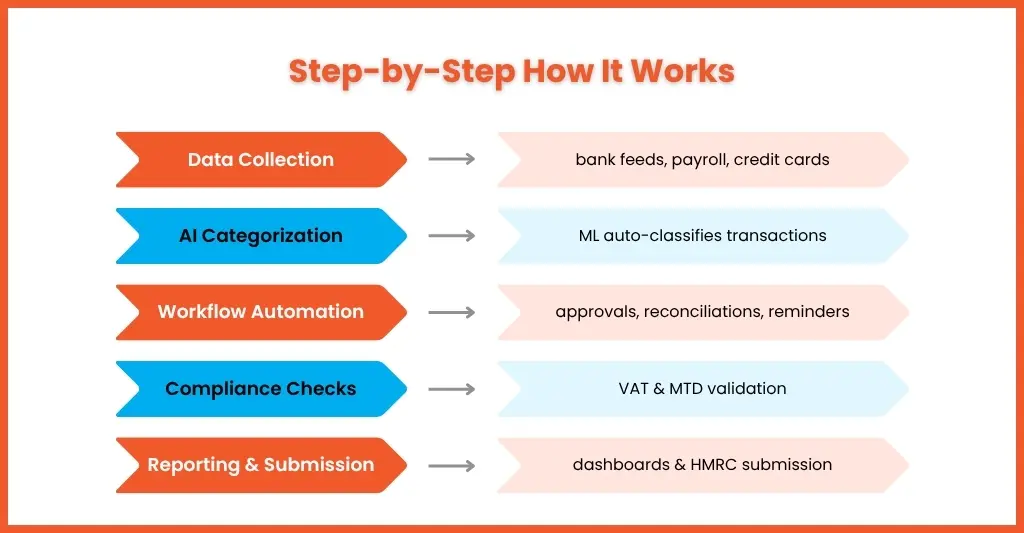
Step 1: Data Collection
The accounting automation software starts with collecting the data automatically from:
- Bank feeds
- Credit cards
- Payment gateways
- Payroll systems
- Expense apps
This eliminates the need for manual data entry and the chances of human error.
Step 2: AI Categorisation
The software will automatically classify transactions using machine learning and predefined rules. The software featuring ML and AI will learn the patterns of the transactions of your clients over time.
Step 3: Workflow Automation
All the approval flows, reminders, reconciliations, and reporting processes will get automated. These tasks consume a lot of time when done manually, and by automating them, you will save considerable time and resources.
Step 4: Compliance Checks
The latest version of accounting automation software will be updated with the latest compliance requirements and will validate VAT codes, detect anomalies, and ensure compliance is met. This will reduce the risk of non-compliance.
Step 5: Reporting & Submission
The reports will be generated automatically and will be submitted directly to the HMRC.
Top Accounting Automation Software Solutions in 2026
You must have noticed accounting automation software flooding the UK accounting market, but not all are the best. Ideally, you must choose the one that meets your present and future requirements. Here are some of the top accounting automation software solutions ideal for accounting practices.
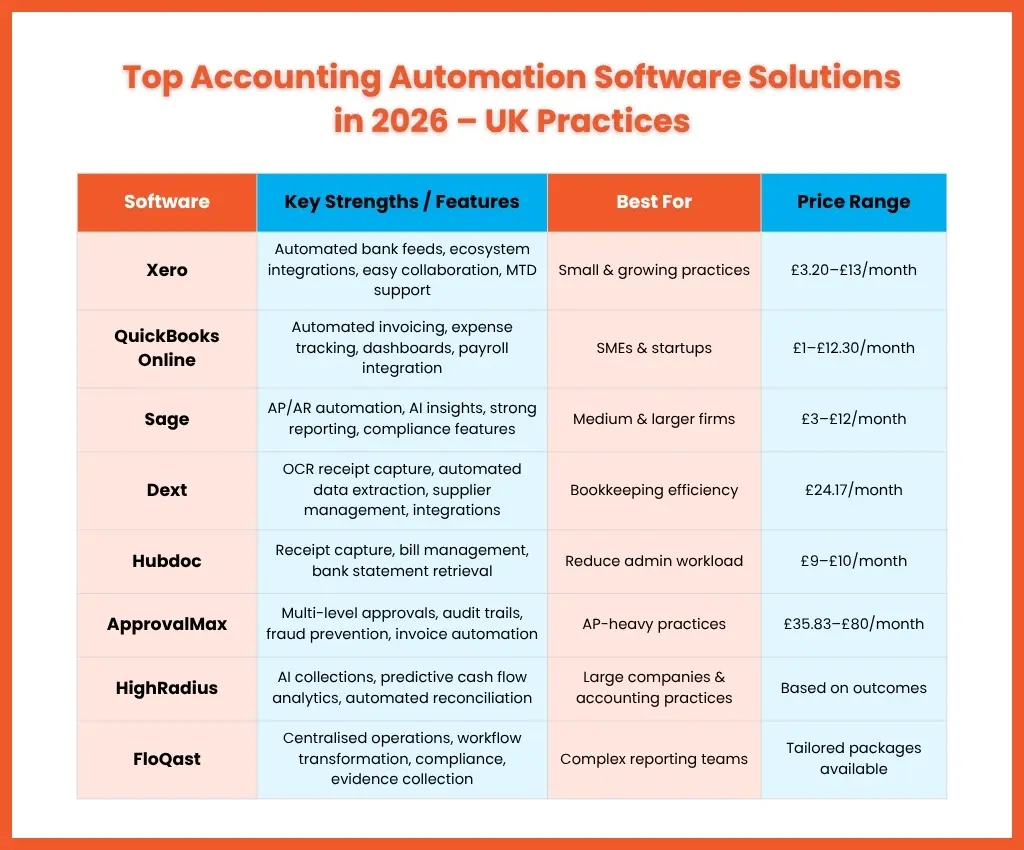
Xero
One of the most popular cloud accounting solutions in the UK is widely trusted by accounting practices for getting their job done.
Key strengths:
- Automated bank feeds
- Strong ecosystem integrations
- Easy collaboration
- MTD compliance support
Best for: Small and growing practices
Price range: Ranging from £ 3.20 per month to £13 per month (subject to change)
QuickBooks Online
QuickBooks Online is another trusted accounting automation software, and it is known for its user-friendly interface and automation capabilities.
Key strengths:
- Automated invoicing
- Expense tracking
- Real-time dashboards
- Payroll integrations
Best for: SMEs and startups
Price range: £1 per month to £12.30 per month (subject to change)
Sage
Sage has widely established itself among practices by automating multi-entity workflows, surfacing real-time insights with AI, and elevating advisory offerings.
Benefits:
- Strong reporting tools
- AP/AR automation
- Compliance-focused features
- Industry-specific modules
Best for: Medium and larger firms
Price range: £3.00 to £12.00 per month (subject to change)
Dext
Dext is an ideal automation software that will automate the process of capturing and processing receipts and invoices.
Features:
- OCR technology
- Automated data extraction
- Supplier management
- Integration with Xero, QuickBooks and multiple other software’s
Best for: Bookkeeping efficiency
Price range: £24.17 per month (subject to change)
Hubdoc
Hubdoc automates document collection by importing all your financial documents and exporting them into data you can use, thus reducing the need for manual data entry.
Benefits:
- Receipt capture
- Bill management
- Bank statement retrieval
Best for: Practices wanting to reduce admin workload
Price range: £9-£10 per month (subject to change)
ApprovalMax
ApprovalMax is built to fine-tune your accounts payable process, enabling practices to give their clients the efficiency and visibility they need to grow with confidence.
Key strengths:
- Multi-level approvals
- Audit trails
- Fraud prevention
- Invoice automation
Best for: practices heavily involved in the accounts payable process
Price range: £35.83 to £80.00 per month
HighRadius
HighRadius is automation software designed to automate order-to-cash, treasury, and accounts payable processes using AI-driven agents.
Key strengths:
- AI collections
- Predictive cash flow analytics
- Automated reconciliation
Best for: Large companies and accounting practices
Price range: Based on the outcomes
FloQast
FloQast automates reconciliations, follow-up, and more to relieve your accounting team of tedious manual work.
Benefits:
- Standardise, centralise, and gain global visibility over operations
- End-to-end transformation of accounting workflows
- Mitigate enterprise risk
- Automate evidence collection
- Adhere to compliance frameworks
- Maintain accuracy, accelerate reporting, and consolidate systems
Best for: Finance teams handling complex reporting
Price range: Tailored packages available
Integration & Compatibility of Automated Accounting Software
The above-mentioned automation software is good because it can integrate with multiple tools and systems.
Choosing to work with software that works alone will create problems like:
- Duplicate work
- Reporting delays
- Reconciliation issues
- Dirty data risks
The best accounting automation software integrates with:
- Xero
- QuickBooks
- Sage
- Payroll systems
- Banking platforms
- Expense apps
- CRM systems
This creates a connected accounting ecosystem instead of isolated tools.
How to Choose the Best Accounting Automation Software
While adequate focus must be placed on the key features when choosing an accounting automation software, there are other factors that cannot be ignored. These factors are:
Assess Your Firm’s Size
Is your client base small and full of small businesses or large businesses? If you are handling the accounts of mostly small enterprises, then you will need simpler tools. For large enterprises, you will need advanced workflow automation and reporting to handle their complex accounting requirements.
Understand Client Complexity
Before you select an accounting automation software, understand the volume of work you do for your clients.
Think about:
- Number of transactions
- VAT requirements
- Payroll compliance needs
- Industry-specific reporting
Based on that, select the software that supports these workflows efficiently.
Evaluate Ease of Use
If you select a software that is too complicated, then its adoption among your accountants and clients will be difficult. Therefore, choose a software that offers:
- Clean interface
- Minimal training needs
- Good support
Consider Scalability
Take the future growth of your practice and your clients into consideration while selecting software. Frequent changes in software will cause workflow disruptions and damage your reputation among your clients.
Compare Cost vs Value
Finding software that is light on your pocket does not mean it will be cost-effective in the future.
Consider on:
- Time saved
- Payroll errors reduced
- Productivity gained
- Client capacity increased
While selecting a software.
Steps to Implement Accounting Automation Successfully
Some of the steps that will ensure smooth implementation of accounting automation are:
Step 1: Review Existing Processes
Under this step, you must identify the bottlenecks and repetitive tasks for which you are getting automation software.
Step 2: Standardise Workflows
Create consistent processes for:
- Reconciliations
- Invoice approvals
- Reporting
- VAT handling
Step 3: Train Your Team
To exploit the full potential of the automation software, you will need to make your accountants familiar with the tool and train them on how to use it properly.
Step 4: Start Small
Always begin with a pilot project, like automating bank reconciliation, before expanding into other aspects.
Step 5: Monitor Performance
Track KPIs like:
- Time saved
- Error reduction
- Turnaround times
- Client satisfaction
Case Studies: Success Stories With Accounting Automation
A small UK practice managing over 80 SME clients struggled during the VAT quarters. The team worked late evenings chasing invoices, correcting manual errors, and reconciling transactions.
After implementing cloud automation tools and bookkeeping outsourcing services through Equallto:
- VAT turnaround times improved significantly
- Manual reconciliation hours dropped
- Reporting accuracy increased
- Staff stress is reduced during peak periods
Most importantly, the firm gained the capacity to onboard new clients without hiring immediately.
Automation did replace accountants; it empowered them.
Frequently Asked Questions (FAQ)
What features define the best accounting automation software?
The best accounting automation software includes:
AI categorisation
Automated reconciliations
AP/AR workflows
Real-time reporting
HMRC integration
Cloud accessibility
Audit trails
What should I expect from accounting automation software in the
first 90 days?
In the first 30 days, expect disruption: data migration, team training, and workflow reconfiguration take time and temporarily slow throughput. Between days 30 and 60, processing times typically begin to improve as the team builds proficiency. By day 90, most practices report measurable reductions in manual processing time and improved error rates. Full ROI is typically visible within two to three quarterly VAT cycles.
How does accounting automation impact compliance and audits?
Automation improves compliance by:
Standardising workflows
Creating audit trails
Reducing human errors
Supporting MTD requirements
Maintaining digital records
This makes audits smoother and less stressful.
What is accounting automation software?
Accounting automation software is a platform that automates routine accounting tasks, such as bookkeeping and payroll, without manual intervention. Instead of manually entering transactions or reconciling bank feeds, the software handles much of the work automatically.
What is the difference between accounting automation software and
AI accounting software?
Accounting automation software uses defined rules and workflow logic to automate predictable, repeatable tasks. AI accounting software uses machine learning — the system learns from patterns in your data to make smarter categorisation and anomaly-detection decisions over time. Most modern tools combine both: rules-based automation for routine tasks, and AI assistance for complex categorisation. The practical distinction matters less than whether the tool solves your specific workflow problem.
Can accounting automation software replace outsourced accounting support?
Not directly. Automation software removes manual processing tasks but still requires qualified oversight to review outputs, manage exceptions, handle complex client queries, and advise on planning. Many practices use automation and outsourced support together: automation handles volume and routine processing, outsourced expertise handles complexity, overflow, and specialist work. This hybrid model is increasingly common among UK practices scaling without adding permanent headcount.
Conclusion
Accounting automation software is no longer a luxury but a necessity for modern accounting practices. It is important for practices that want to:
- Scale sustainably
- Improve efficiency
- Reduce errors
- Stay compliant
- Deliver faster client service
Only those practices will succeed that have invested in making their system and workflow smart. And increasingly, UK practices are combining automation with outsourcing support to create scalable hybrid models.
That’s where providers like Equallto are coming up and helping practices move beyond manual accounting by combining skilled outsourced support with modern accounting automation workflows.
Are you spending long hours on your repetitive accounting tasks? It’s time to connect us and build a smarter practice.
