
Did you know? HMRC has a system of points that generates a penalty of 200 pounds on the clients who have 4 late VAT returns. This is a significant threat to accounting companies that deal with more than one business. Quarterly filers receive 1 penalty point with each late or wrong, digital VAT return, which accumulate to the threshold where the fine is imposed, where further penalties increase as the failure to submit on time recurs.
Making Tax Digital (MTD) for VAT is mandatory for all VAT-registered businesses, if using Making Tax Digital VAT software, you can avoid penalties for your accounting practice. This software also helps you automatically submit VAT returns and makes it easier to manage clients for MTD compliance.
This guide explains what this Software is about, why your practice needs MTD-compatible software, the key features to look for, the best options available, how to get started, and common mistakes to avoid.
What Is Making Tax Digital VAT Software?
Approved MTD software is really helpful for businesses. It allows them to connect their accounting records to the tax authority securely. The MTD software keeps all records, automatically calculates taxes, and shows businesses how much they owe or how much they can get back. This means businesses can submit their returns every quarter without using spreadsheets or manual portals. The Making Tax Digital VAT software makes tax management much faster & simpler.
Some solutions are full accounting platforms like Xero or QuickBooks, which handle all financial records. Others are bridging tools that link existing systems, such as spreadsheets, to HMRC.
All approved software like Xero, QuickBooks Online, Sage Business Cloud, Free Agent, GoSimpleTax, Bokio.
Why Accounting Practices Need MTD Compatible Software
Since April 2022, all VAT-registered businesses must submit their returns digitally via HMRC-approved software. Spreadsheets or manual methods alone are no longer allowed, and practices are held directly accountable for late or incorrect filings. Just four errors per client trigger a £200 fine under the points system, which can scale to thousands for busy practices, especially with repeated mistakes.
- Avoid Penalties: The software finds mistakes before you submit your tax return. It catches errors and keeps a digital record of everything for six years. This way, you are fully compliant with HMRC rules.
- Save Time: The software does calculations and quarterly filings for you. It also sorts out reconciliations. This can save you a significant amount of time, anywhere from 50% to 70%. You can use this time for tasks that make you money.
- Scale Your Practice: Clients can be managed in bulk using specialised software, and dashboards are easily accessible, and integration is available with Xero, QuickBooks, and Sage. Client with larger volumes can be handled without hiring extra staff.
- Build Client Trust: Your clients can see their records instantly. They also get their refunds faster. The software makes sure there are no errors. This makes your clients happier. They are more likely to stay with you.
- Stay Ahead: Your practice is ready for the 2026 ITSA changes and is also opening new opportunities for advisory services in a digital-first tax environment.
This is why you need software that works with MTD. It protects you from fines. It also makes your work easier. It helps your business grow in the long run. MTD software is really important.
Features to Look for in the Best Software for Making Tax Digital for VAT
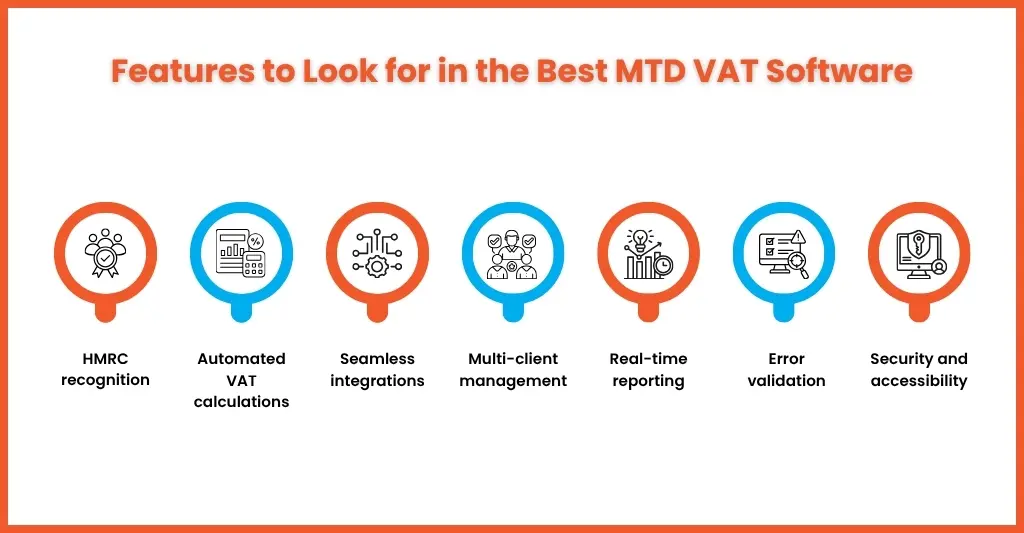
The software for Making Tax Digital for VAT does much more than just meet HMRC’s standards. It also makes work easier and saves accountants’ time. When choosing software, here are some things to consider:
- HMRC Recognition: The software must be on HMRC’s approved list. This list has over 460 options, so make sure your choice is on it to get everything right.
- Automated VAT Calculations: Your software should handle all VAT return calculations for you, including output tax, input tax, adjustments, and acquisitions. This helps reduce mistakes with your VAT.
- Seamless Integrations: You want software that integrates with the systems you use, such as Xero, QuickBooks, and Sage. It should also connect to your bank feeds. This makes it easy to obtain the necessary data.
- Multi-Client Management: When you have a lot of clients, you need a system that helps you keep track of what they send in and any problems that arise with them. This way, you can stay on top of things with all of your clients. This makes managing clients easier and stress for accountants is reduces.
- Real-Time Reporting: It’s helpful to have features such as estimates of your VAT liability, ready-for-audit exports, and client portals. These things give you insights and make everything more transparent.
- Error Validation: The software should include checks to ensure you are following all HMRC rules. The software should be able to store your records for 6 years. This helps prevent mistakes and keeps them ready for audits.
- Security & Accessibility: You need software that is based in the cloud. It must comply with GDPR. You should be able to access it from your device. The software should also have options to connect to Excel. This lets you work flexibly while keeping your data safe.
It is advisable to trial a software before you decide which one to use. Xero is a tool that makes things easier for you. It automates tasks, provides dashboards, and also simplifies client management.
How MTD VAT Software Works Step by Step for UK Practices
The Making Tax Digital VAT Software connects directly to the HMRC via APIs. This makes it easier for people to manage their records and submit them. It is also faster and more accurate. The VAT Software helps all clients registered for VAT comply with the rules.
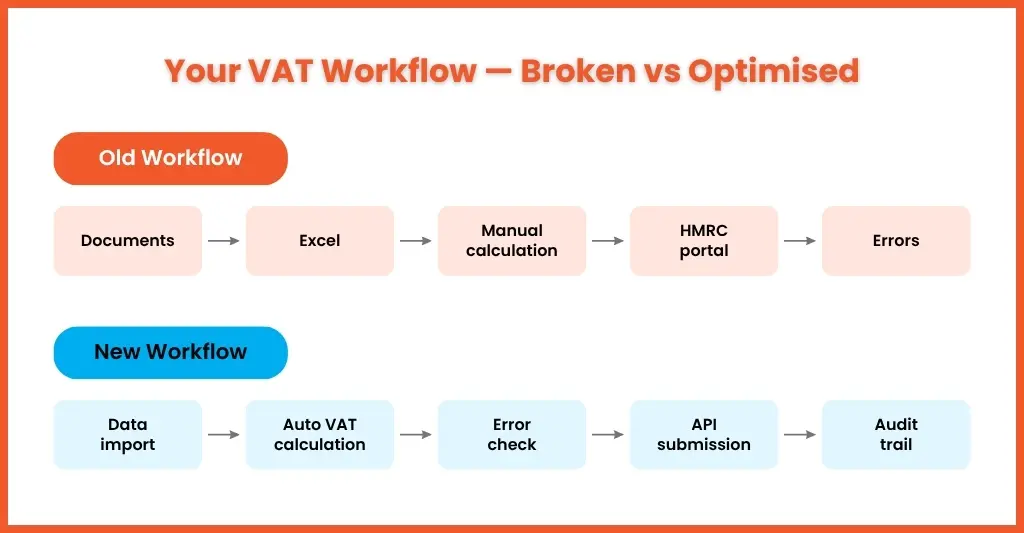
- Import Digital Records: The software gets transactions from bank feeds, invoices or accounting platforms like Xero and QuickBooks. This means all the data is linked together digitally. You do not need to use spreadsheets.
- Calculate VAT Automatically: The software calculates all the VAT. It adds up all the numbers, including output tax, input tax you can get back, adjustments and acquisitions. You can see how much VAT you owe before you submit it.
- Check for Errors: The software checks for mistakes. It highlights missing information, partial exemptions and other issues. You can fix these problems before you file your VAT return. This reduces the risk of getting fined by the HMRC.
- Submit Securely: The software automatically sends your VAT return to HMRC. It uses the format, and you get confirmation straight away. You do not need to use the portal.
- Keep an Audit Trail: The software stores all your records digitally for six years. This makes it easy to look at your submissions and provide evidence if you get audited.
The Making Tax Digital VAT Software does all this for every client every quarter. There are also tools to help people who already use Excel. These tools make it easy to switch to submissions. The VAT Software helps people integrate their existing Excel records with the HMRC. This makes the transition to submissions smooth.
Comparison of Top MTD Compatible Software for UK Accountants
In 2026, several HMRC-approved software solutions stand out for balancing support for multiple clients, automation, & cost. Every platform has strengths depending on the size of the practice, the client base, and the reporting needs.
| Software | Best For | Key Features | Pricing (2026 Est.) |
| Xero | Cloud-first practices | VAT automation, client dashboards, 50+ integrations | £10–£50/user/month |
| QuickBooks Online | SMEs and multi-client portfolios | Bank feeds, error checks, mobile app | £16–£100/month (tiered) |
| Sage Business Cloud | Large firms | Advanced analytics, custom reports | £25+/user/month |
| FreeAgent | Small businesses/freelancers | Simple submissions, real-time tax pots | £19–£39/month (free w/ banks) |
| Bokio | Budget-conscious practices | Free core MTD VAT, unlimited clients | Free; premium £10/month |
Software depends on the practice size, client complexity, and budget. Xero is ideal for large, growing firms; QuickBooks and Sage excel at multi-client reporting; and FreeAgent or Bokio suit smaller practices or freelancers. As all platforms make it easy to submit accurate VAT returns, follow the HMRC MTD compliance guide and maintain 6-year audit trails to help practices stay compliant and work more efficiently.
Choosing the Right VAT Software for Your Clients
When it comes to Making Tax Digital VAT software, one size does not fit all. You need software that is tailored to each client’s needs. This ensures efficiency and compliance with VAT regulations.
- Small Firms or Freelancer Accountants: Bokio and FreeAgent are good options. Bokio is free. You can use it for unlimited clients. Each software offers VAT submissions. They also have bank feed integration. They are easy to learn. This makes them ideal for businesses or solo professionals who are just starting out.
- Medium Accountant Firms: Xero and QuickBooks Online are suitable choices. These platforms provide automated workflows. You also get real-time dashboards and over 50 integrations. This enables you to handle growing transaction volumes efficiently.
- Larger Accounting Firms: Sage Business Cloud is a good option. It is designed for operations. The software offers analytics. You also get custom -client reporting and virtually unlimited scalability.
When evaluating the software, there are things to consider. You need to think about the training time required. It is also important to have UK-based support available. The software should be accessible on devices. You also need to consider readiness for changes. For example, the 2026 ITSA rollout is a change that you need to be prepared for.
Benefits of Using MTD VAT Software for Accounting Practices
MTD software helps accounting practices to become more efficient, reduce risk, and increase profitability.
- Penalty Protection: The software checks for errors and significantly reduces mistakes. This helps practices avoid fines and compliance issues.
- Time Savings: The software automates VAT tasks, including calculations and submissions, which typically account for 50–70% of time. Staff can then focus on higher-value work.
- Revenue Growth: The software provides dashboards that help practices manage more clients—up to two to three times as many—without the need to increase staff.
- Client Retention: The software features real-time portals that improve transparency. Clients can receive refunds more efficiently, and errors are minimised. Overall, client satisfaction increases by 30–40%.
- Advisory Edge: The software provides insights drawn from VAT data, enabling practices to plan proactively and offer additional services. This creates further revenue opportunities.
Ultimately, Making Tax Digital VAT software delivers tangible benefits to accounting practices, improving both ROI and operational efficiency. This section, together with the “Choosing” section, provides essential guidance and should be considered together.
Case Study: How a UK Practice Streamlined VAT with MTD Software
From Manual VAT to Digital software
Practice: XYZ accounting firm,
The firm struggled to keep track of manual spreadsheets based on VAT. It caused a lot of mistakes, missed deadlines and fines from HMRC. The staff had to spend a lot of time doing simple maths, so they did not have time to do other important work.
To fix these issues, the firm began using Making Tax Digital VAT software. This involved calculations, checking numbers, and sending information to HMRC automatically. The firm also got a dashboard that showed all their clients simultaneously and a special portal for clients. This made it easier for the accountants to do their work and talk to the clients.
Now the accountants work more efficiently, and the firm can do more work for clients without hiring more accountants. MTD software really helped the firm with VAT and the clients’ work.
Frequently Asked Questions About VAT Software and MTD
How do I know if my current software is MTD compliant?
You can check the HMRC’s official list at Tax Service. Search by software name or filter for VAT features and look for the MDT for VAT compliant” badge or direct API confirmation.
Can HMRC grant exemptions from using MTD-compliant software?
Yes, rare digital exclusion exemptions require HMRC application with evidence. No turnover-based exemptions since 2022, all VAT registered businesses must comply.
How do I switch VAT clients to a new MTD-compatible platform?
Notify clients, Export data from the old system, and import it into the new software. Test API submissions, train staff, and go live for the next quarterly filing.
What if a VAT submission gets rejected by HMRC?
The software highlights the errors and corrects the data and resubmit via the API the same day, prompt fixes prevent penalties under HMRC’s points system. (e.g., MyTaxDigital)
Does MTD software work with Excel Spreadsheets?
Yes, via HMRC-approved bridging tools and excel for records, bridge handles API submission/audit trail.
Conclusion
In 2026 every UK company that is registered for VAT needs to use Making Tax Digital VAT software. This software is very important for doing things. You should pick MTD software that fits your clients needs, like Xero, QuickBooks or Sage. This software should work well with things and be able to grow with your company.
You should not use software that has not been approved. Try out the demos first so you do not get fined. This way you can save time reduce mistakes. Make your clients trust you more.
If you want to make your work easier go to Equallto today. They have MTD solutions that have been approved by HMRC and experts who can help you get started. They can help UK accountants.
