
Payroll automation includes the use of software and technology to automate payroll calculations, taxes, deductions, payslip generation, compliance, and reporting. By saving time and reducing errors, payroll automation has transformed from a luxury into a necessity for accounting practices that aspire to be efficient, compliant, and competitive.
Let’s understand this through an example: a small accounting practice had a payroll team handling multiple SME clients. Each month, its staff was spending countless hours on entering employee information, calculating deductions, checking pension contributions, and amending mistakes made during manual data entry. These tasks created a stressful situation, especially when the payroll deadlines are near. A single mistake will trigger client complaints.
With the introduction of payroll automation, payroll processing became faster, calculations more accurate, and their team members were able to focus more on high-value advisory work instead of repetitive payroll work.
As per the 2026 Payroll Efficiency Report, 9 out of the 10 payroll teams experienced payroll errors in the previous year, and 48% of professionals blame manual processing for these errors.
This creates an opportunity for you to embrace payroll automation to eliminate compliance risks and improve and scale productivity and payroll services more effectively.
What Is Payroll Automation?
Payroll automation uses payroll software or automation tools to streamline payroll-related tasks with minimal manual intervention. Be it calculating employee wages to handling payroll tax deductions and payslip generation, payroll automation will automate repetitive and time-consuming processes so that payroll teams can focus on high-value work.
Typical payroll automation tasks include:
- Employee data management
- Gross-to-net calculations
- PAYE tax calculations
- National Insurance deductions
- Pension contributions
- Payslip generation
- HMRC submissions
- Payroll reporting
- Payment processing
The goal is simple: reduce manual work while improving speed, consistency, and accuracy.
Key Takeaways
- Payroll automation reduces manual workload by automating calculations, deductions, reporting, and compliance tasks.
- Minimises payroll errors, which are often caused by manual data entry, spreadsheets, and disconnected systems.
- Improves HMRC compliance by applying current tax rules, generating RTI submissions, and maintaining accurate payroll records.
- Helps in processing more payroll clients without hiring additional staff, making payroll services more scalable and profitable.
- Provides real-time access to payroll information, reports, and employee data.
- Frees up valuable time for advisory services, client relationships, and business growth.
- Combining payroll automation with outsourced payroll support can help you expand your payroll offering further.
How Does Automatic Payroll Work?
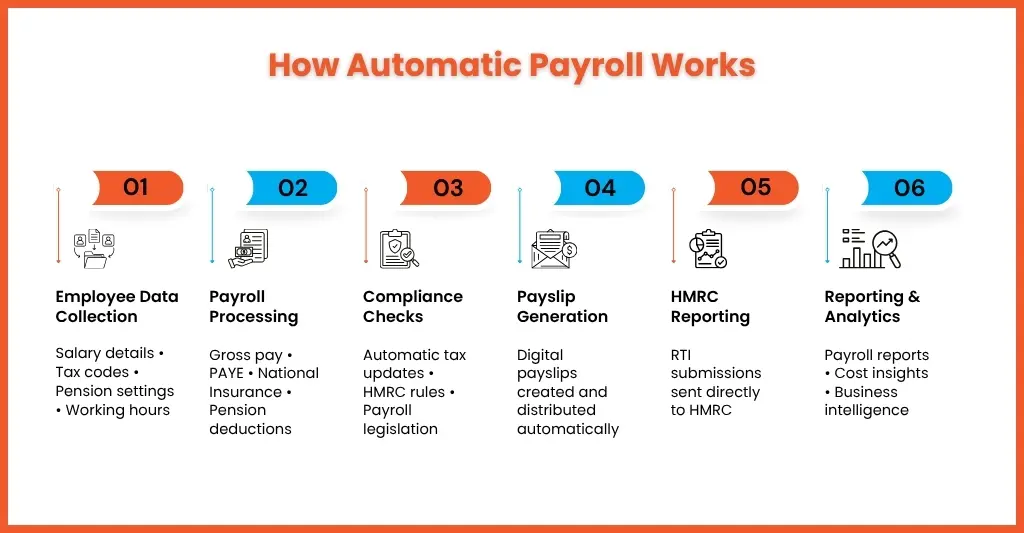
Automatic payroll works by collecting employee and payroll data, applying predefined rules and calculations, and generating payroll outputs automatically. A typical automated payroll workflow looks like this:
When payroll is automated, it means automation of employee and payroll data collection,
Step 1: Employee Data Collection
A payroll software or AI tool will automatically collect and store employee information such as:
- Salary details
- Tax codes
- Pension settings
- Benefits information
- Working hours
Step 2: Payroll Processing
The payroll software will automatically start calculating the following:
- Gross pay
- Tax deductions
- National Insurance contributions
- Pension deductions
- Statutory payments
Step 3: Compliance Checks
Latest versions of payroll software are designed to keep and maintain payroll compliance by applying the current tax rates and payroll legislation automatically.
Step 4: Payslip Generation
Once all the payroll calculations and deductions are done, the payslip will be generated and distributed to the employees electronically or in a format that is decided on.
Step 5: HMRC Reporting
HMRC-recognised payroll software is used for sending real-time information submissions directly to the HMRC.
Step 6: Reporting and Analytics
The data generated by the payroll software is used to generate payroll reports, which can be used by you to guide your clients or provide them to your clients, giving them performance insights.
The result is a streamlined process that requires significantly less manual intervention than traditional payroll methods.
7 Key Benefits of Automated Payroll Services
Automated payroll services are being increasingly trusted by practices due to the benefits they offer. These benefits are:
Reduce Payroll Errors
Manual data entry is one of the biggest causes of payroll mistakes. Through payroll automation, you will be reducing the possibility of:
- Calculation errors
- Incorrect deductions
- Duplicate entries
- Missing information
Fewer payroll errors mean happier clients and fewer payroll corrections.
Saves Time on Running Payroll
Payroll tasks have become more complex and laborious. Automation can take over much of the repetitive manual payroll tasks like data entry and calculations to free up time to spend on more impactful, strategic work.
Streamline Tax Filing
Payroll automation through AI-enabled payroll software can streamline tax filing, ensuring precision and standardisation of tax calculations as per the current laws and regulations. This reduces the risk of penalties and compliance issues.
Build a Scalable Process
When your practice expands or your client’s payroll volume goes up, your workload increases. Payroll automation will ensure managing larger workloads without proportionally increasing staffing costs.
Save Money
More manual payroll work means more expenses on recruiting payroll staff, along with expenses on training and related office infrastructure, which is an expense that a small accounting practice cannot carry.
By switching to payroll automation, you can cut down on a lot of administrative overhead, spend less time on manual payroll tasks, and allocate resources efficiently.
Better Employee Experience
Your clients’ employees benefit from:
- Accurate payroll
- On-time payments
- Easy access to payslips
- Faster issue resolution
A positive payroll experience improves trust and satisfaction.
Real-Time Reporting
These days, clients expect quick answers which cannot be fulfilled through manual payroll. Through cloud-based payroll systems, you can give your clients access to payroll data instantly. It improves transparency and enables faster decision-making.
Manual vs Automated Payroll: A Side-by-Side Comparison
| Feature | Manual Payroll | Automated Payroll |
| Data Entry | Manual | Automated |
| Payroll Calculations | Manual | Automatic |
| Error Risk | High | Low |
| Processing Time | Time-consuming | Fast |
| Compliance Updates | Manual monitoring required | Automated updates |
| Reporting | Manual preparation | Instant reports |
| Scalability | Limited | Highly scalable |
| Cost Efficiency | Lower efficiency | Higher efficiency |
For most growing accounting practices, automated payroll provides a clear advantage.
Must-Have Features of a Payroll Automation System
Many payroll software programs are the best, but not all are the same. When you are looking for payroll software, make sure it has certain essential features:
Employee Data Management
It’s a simple feature but a vital one that payroll software needs to have. The software you select must be able to store key information like the employee’s address, bank details, pensions, and salary.
Compliance Tools
With tax codes getting changed frequently, you need to adopt an automation tool or a payroll software that will automatically update tax codes and perform EPS and FPS reporting.
Automate Employee Payments
Employees need to get paid on time, and that consistency can only be maintained when the payment is automated. Getting the payroll software with this feature will ensure consistency, and you and your clients will get a sense of the cash flow.
Calculations
Most payroll software can automate calculations for compensation, tax deductions and National Insurance contributions in the United Kingdom.
Reporting
See to it that you select a payroll software that generates reports automatically for team members, compliance reporting, and for your clients to give them insights for decision-making.
Payroll Processing
Manual processing requires a person to spend a few days intervening and running the cycle. Automated systems can be done at any time without constant oversight needed.
Security Controls
Payroll data is sensitive and must be protected at all times; therefore, seek a payroll software that has strong security features like data encryption and access controls.
Software Integrations
The payroll system should integrate smoothly with:
- Accounting software
- HR systems
- Time-tracking tools
- Pension providers
Types of Payroll Automation Software
There is a range of payroll automation software available. Some of them are:
Enterprise Resource Planning (ERP)
ERP systems support payroll by consolidating employee information, performing automated calculations for wages and deductions, and ensuring compliance with payroll regulations. They also generate comprehensive payroll reports and integrate payroll data with other business functions such as HR and finance.
All-in-One Systems
All-in-one payroll automation systems integrate payroll, benefits, time tracking, and other HR functions into a single platform.
Payroll Software
Modern payroll software automates manual payroll tasks, freeing up time and resources for strategic initiatives. This software offers features like real-time data processing, automated tax calculations, and compliance management.
How to Implement Payroll Automation in 5 Steps
You can achieve payroll automation with ease; just follow these 5 steps.
Step 1: Review Your Current Process
Find out what is ailing your current payroll process by identifying
- Manual bottlenecks
- Frequent errors
- Time-consuming tasks
Understanding current challenges helps prioritise automation opportunities.
Step 2: Choose the Right Payroll Software
The best payroll software will be the one that meets your needs. Look for their:
- Expertise
- Your future growth projections
- Assessing payroll complexity
- Reviewing tech integration
- Evaluating ease of use
- Analysing cost
Step 3: Get the Data Ready
Before migration, review employee records carefully by gathering, cleaning, and preparing them for transfer. Accurate data improves implementation success.
Step 4: Migration of Data
Start migrating the data from your old system to the new one. Create a checklist to ensure all data points have been accurately transferred and that all data is correctly formatted for the new system.
Step 5: Test Run
Before you can start using a new payroll software, perform thorough testing to ensure calculations, deductions, and other payroll processes are accurate and compliant.
Common Challenges of Payroll Automation (and How to Solve Them)
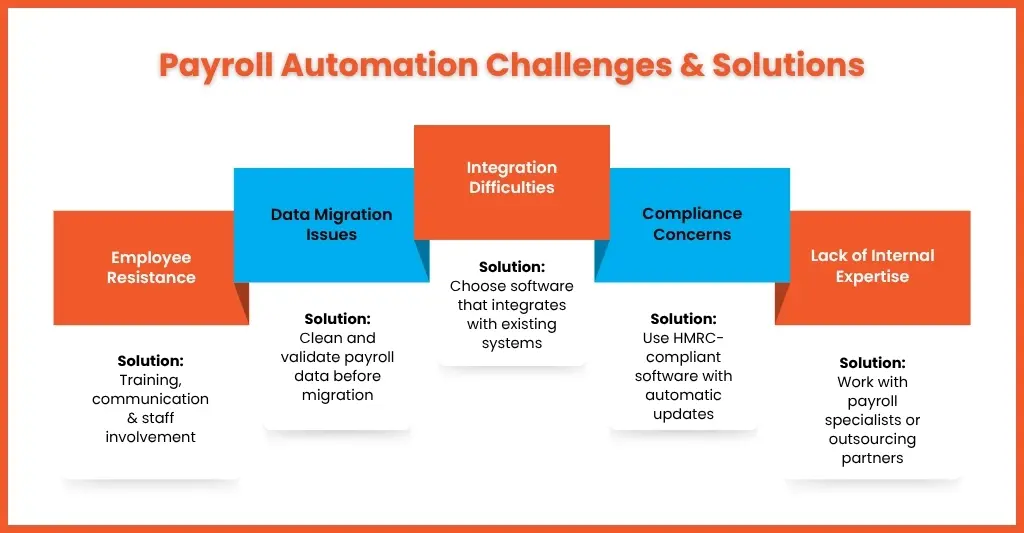
Implementing payroll automation is not an easy sail; it has its share of challenges that can be addressed only through careful planning. Understanding these challenges will help you in planning in advance so that a smooth transition can be achieved.
Employee Resistance to Change
One of the biggest challenges in implementing payroll automation is resistance from your employees. Your staff will assume that automation will put them out of a job; instead, it must be explained to them that only repetitive manual tasks, like manual calculations, data entry, report generation, and compliance updates, will be automated. This gives them time to focus on value-adding activities like client communication, compliance oversight, problem-solving, and advisory services.
How to Solve It
Explain to them the benefits of payroll automation. Provide them with the training and involve them in the implementation process, which will generate confidence in them.
Data Migration Issues
Payroll software will work at its best only when the payroll data is perfect. But some of the old records might contain inaccuracies, duplications, incomplete or outdated information. Such poor quality data will create problems from day one.
How to Solve It
Before migrating to a new system, conduct a comprehensive payroll data review.
This should include:
- Verifying employee records
- Updating personal information
- Checking tax codes
- Reviewing pension details
- Removing duplicate records
- Validating payroll history
A well-planned data cleansing process significantly reduces implementation risks and improves long-term payroll accuracy.
Integration Difficulties
Payroll never works in isolation; it needs multiple software programs for multiple accounting tasks, and all these tools must be able to communicate with each other. If not, then your staff will have to transfer information manually, limiting the efficiency gains automation is supposed to provide.
How to Solve It
When selecting a payroll automation solution, integration capabilities should be a key consideration. The more connected your systems are, the greater the efficiency gains payroll automation will deliver.
Compliance Concerns
We have come across many practices that are concerned that payroll automation will increase their compliance errors, especially during the implementation phase.
You know that payroll regulations frequently change, including:
- PAYE requirements
- National Insurance rates
- Statutory payments
- Pension regulations
- HMRC reporting obligations
Any disruption during implementation could potentially lead to inaccurate submissions or missed deadlines.
How to Solve It
Choose software that offers:
- Automatic legislative updates
- HMRC integration
- Real-Time Information (RTI) reporting
- Compliance monitoring tools
- Audit trails and reporting functionality
Maintain a robust review during the implementation process. By running a series of tests and regular audits, you can make sure compliance is maintained during the transition.
Lack of Internal Expertise
As a small accounting practice, it will be too much to expect that you will have the resources to handle the transition.
Implementing a new payroll system requires expertise in several areas, including:
- Payroll operations
- Software configuration
- Data migration
- Compliance requirements
- Process redesign
- Staff training
Without proper planning, implementation projects can become delayed, exceed budgets, or fail to deliver expected results.
How to Solve It
You can either hire an experienced payroll specialist who can understand payroll operations and automation.
If you want to scale your payroll services without expanding internal teams, outsourcing can be particularly valuable. By partnering with specialists such as Equallto, accounting practices gain access to experienced payroll professionals who can support payroll processing, manage workloads, and help firms leverage payroll automation effectively.
The Future of Payroll Automation: 5 Trends for 2026 and Beyond
Payroll technology is evolving continuously, and there are certain trends that are shaping its future. These trends are:
AI-Powered Payroll Processing
AI in payroll will become more common and will help in identifying anomalies in a much quicker way. It will further improve accuracy and automate decision-making.
Predictive Payroll Analytics
Your clients are increasingly demanding insights to support decision-making in recruitment and forecasting. Payroll analytics provides those insights by analysing the payroll data in an efficient way.
Greater Integration
Payroll software will be designed to get interconnected with other AI tools and software related to finance, HR and workforce management.
Enhanced Employee Self-Service
Employees increasingly expect instant access to payroll information through mobile devices.
Outsourced Payroll + Automation
There will be an increased preference for payroll outsourcing providers that offer payroll outsourcing services combined with payroll automation.
This hybrid model provides:
- Technology-driven efficiency
- Specialist expertise
- Improved scalability
- Reduced operational pressure
People Also Ask
What are the benefits of using cloud-based payroll management tools?
Cloud-based payroll systems provide real-time access, automatic updates, enhanced security, easier collaboration, and improved scalability. They also support remote working and help firms manage payroll more efficiently. Currently, all well-known payroll software like Xero is cloud-based and MTD-compliant, making life easier for countless accounting practices in the UK.
Can payroll run be automated to save time and reduce errors?
Yes. Modern payroll software can automate calculations, deductions, reporting, payslip generation, and HMRC submissions. By removing humans in handling repetitive payroll tasks, payroll automation can significantly reduce manual work and helps minimise payroll errors. The time saves can be repurposed for taking on high-value advisory work, client relationships, and business growth.
How long does it take to implement payroll automation?
The timeline to implement payroll automation depend on the size and complexity of the payroll you handle. If you are handling payroll of small business the implementation might happen within weeks. For larger organisations it will require several months for integration. Make sure to select a payroll software that meets your requirements and keep all the payroll data of your clients in proper order so that transition goes smoothly.
Does HMRC recognise QuickBooks?
QuickBooks is one of the well-known and HMRC recognised software. It is MTD-compliant and practices have been using it for getting their VAT and Income Tax done as per MTD rules. QuickBooks has been designed in a way that users can get their payroll calculations done and send their reports to HMRC directly through QuickBooks software.
What is a payroll checklist?
A payroll checklist makes the businesses remain organised, and no step is left out. It creates uniformity in the payroll processes and minimises the possibility of mistakes. Through payroll checklist you can avoid making payroll mistakes like missing out on deadlines or deductions which will lead to penalties by the HMRC.
Conclusion: Take the Stress Out of Payroll
Payroll will remain a critical function that an accounting practice will have to perform, but it does not have to be time-consuming.
Payroll automation can make your life easier by taking over manual tasks, improving accuracy, and strengthening your compliance and capacity to handle growth. By automating payroll, you can deliver the best results for your clients.
For practices looking to scale payroll services without increasing internal pressures, combining payroll automation with outsourced support offers a powerful solution.
With the right technology, processes, and specialist support from Equallto, payroll can move from being a monthly challenge to becoming a streamlined, scalable service that supports long-term growth.
Get set to transform your payroll by contacting us and becoming future-ready.
